Tuesday, May 28, 2013

Blog Gaps and Consolidation

I've blogged on a number of platforms since around 2002. First it was LiveJournal and then I blogged on Windows Live Spaces for a number of years. Finally I ended up blogging on msdn.microsoft.com.

In all the time I've been blogging, much of it has been for professional reasons. Most of my blog posts from 2003-2005 ended up as a headlines and stories on various MSDN Developer Center properties at Microsoft. I've tried on and off to either balance personal blogging with professional blogging through tags and through experimenting with different platforms.  This blog was one of those experiments and I brought it back to life recently when I decided to start posting about some of the writing I've been doing.

So just for the record, you can find a lot of my old stuff on the following sites:

http://brianjo.livejournal.com
http://brianjo.wordpress.com
http://blogs.msdn.com/b/brianjo/

Sadly, Windows Live Spaces was shut down a few years ago. (I loved publishing there.) I was able to move most of my posts to the WordPress blog, but some of it is a real mess and all the spam comments from Spaces were imported along with the posts. Most of it is searchable on Google, but it's not pretty.

I had also set up a motorcycle blog recently. I'm going to move the posts to this blog and consolidate here. I need to do some more motorcycle blogging. It gives me an excuse to ride.

I currently post to Facebook multiple times a day and I'm still on Twitter.

I'm not sure how much blogging I'm going to do in the future, but it's nice to have a place to put longer posts.

Sunday, March 24, 2013

Monday, March 18, 2013

Baseball Statistics with R – Batting Average

I'm working on a new book about the R programming language. R is a language that is designed for use with statistics and data. I use it to analyze sports and social networking. I thought that it would be fun to write the book focusing on baseball statistics using data from Major League Baseball.

This post pulls the Batting Average topic from the book. I’ll try to provide enough information to get you started if you’re new to R. The book will include a tutorial and information about the R language.

Statistics in baseball can run from the very simple to the very complex. The complex end of the spectrum leads into the more advanced field of sabermetrics. Some of the advanced sabermetric calculations can’t be done without access to proprietary databases, and so for the most part my book will focus on what we can figure out using the data that’s easily available.

Almost everything you want to know about baseball statistics is already available on the internet, sliced and diced for you from sites like Baseball Prospectus and Fangraphs. It’s a lot of fun though, to sift through the data yourself. R is a great laboratory for that.

To get started, you’ll need R and you’ll need the baseball database. I would also suggest getting an IDE to make your work easier. Here are some links to get started:

The Comprehensive R Archive Network – This is where you can download R for the platform of your choice.

SeanLahman.com -   Sean Lahman maintains Lahman’s Baseball Database, which includes data on Major League Baseball going back to 1871. For the samples I create, you’ll need the comma delimited version of the database. Unzip it to a convenient place on your PC and keep the path handy.

RStudio – There are a number of IDEs available for R, but my favorite is RStudio. This IDE makes it very easy to edit and run code, import .csv data into data frames, and to load R packages.

sqldf – sqldf is the package I use to run SQL statements on R data frames. There are a couple of different ways that you can access databases in R, but this one is very simple and it’s very easy to get up and running with it. By default sqldf uses SQLite on the backend, but it can be configured to use other database programs as well.

Install R and RStudio and spend some time on a couple of the tutorials available on the internet. Install the sqldf package and take a look at the documentation.

Finally unzip the baseball database to a convenient location on your computer.

The following is the Batting Average topic. I would appreciate feedback, so please feel free to leave a comment or drop me a note at brianjo@gmail.com.

Batting Average

Batting average is perhaps the best known of all baseball statistics. It’s a favorite of fans because it’s a simple calculation. A player’s batting average is calculated by dividing the number of Hits by the number of At Bats. This calculation does not count Walks, Sacrifice Flies, Sacrifice Hits, Hit by Pitch, or Catcher Interference.

Formula:

BA = H/AB

Batting average can be calculated for any arbitrary number of At Bats, but it is generally used to describe batting performance over a series, a streak, a season, or a career.

Let’s take a look at how to calculate batting average in R for a player over the course of a season and then do the same for a career.

First we need to load up two tables. The Master table will give us the details we need on the player and the Batting table will let us take a look at those statistics.

> Master <- read.csv("~/SkyDrive/Documents/Stats/Baseball/Master.csv")
> Batting <- read.csv("~/SkyDrive/Documents/Stats/Baseball/Batting.csv")

Tables in R are generally referred to as data frames. Now that we have some data frames loaded in, let’s narrow things down and get the statistics for the player we’re looking for. In this case, let’s take a look at how Ted Williams did in 1941. To do this we’ll perform two steps. First we need to get Ted Williams’ playerID from the Master table:

We’ll use sqldf for our query:

> library("sqldf", lib.loc="C:/Users/Brian/R/win-library/2.15")
> tedwill <- sqldf("SELECT playerID FROM Master WHERE nameLast='Williams' AND nameFirst='Ted'")

So now we have Ted Williams’ playerID in the value tedwill. We can use that in our code, but it’s just as easy in this case to take note of the actual ID and use it in our next query. So let’s pull Williams’ stats out of the Batting data:

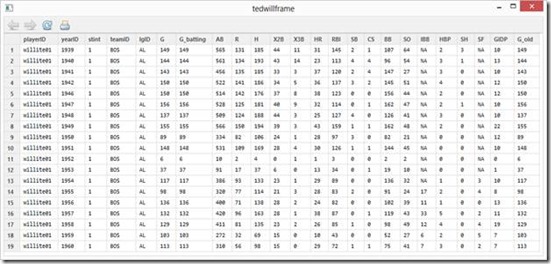
> tedwillframe <- sqldf("SELECT * from Batting WHERE playerID='willite01'")

This produces a nice table that contains Ted Williams’ career batting statistics.
clip_image002

Now that we’ve narrowed things down a bit, let’s calculate Ted’s batting average for 1941.

First, we’ll isolate the year we’re looking for:

> tedwill41 <- sqldf("SELECT * from tedwillframe WHERE yearID=1941")

Then we’ll perform a calculation based on the values for hits (H) and at bats (AB) for that year. Note that columns are accessed from the data frame with the $ character.

> tedwill41ave <- tedwill41$H/tedwill41$AB

We can type in tedwill41ave to see the result:

> tedwill41ave
[1] 0.4057018

Of course, batting averages are usually calculated to the hundredths place so we can round up the result in our query like so:

> tedwill41ave <- round(tedwill41$H/tedwill41$AB, digits=3)

Because we pulled Williams’ batting data into a single table, we can get his lifetime batting average by summing the Hits and the At Bats columns and performing our calculation. We’ll also use the round function and combine this all into a single command:

> tedwilllife <- round(sum(tedwillframe$H)/sum(tedwillframe$AB), digits=3)
> tedwilllife
[1] 0.344

As a quick review, for the lifetime average, we summed the column H from the table tedwillframe with sum(tedwillframe$H) and we did the same with the column AB. We divided H by AB and we wrapped all that in the round function which gave us the average rounded to 3 digits.

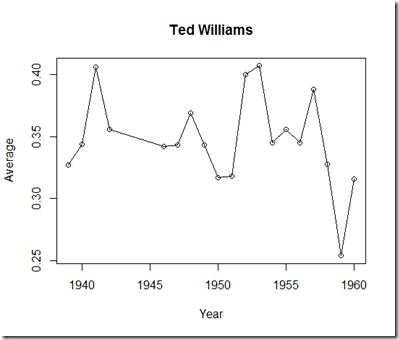
Finally, let’s create a new data frame that contains Ted Williams’ batting average year by year and chart the average.

R is really powerful in that you can perform calculations on vectors very easily. This means we can take a table full of batting data and perform all sorts of interesting calculations on the data.

> tedwillyby <- data.frame(tedwillframe$yearID, round((tedwillframe$H / tedwillframe$AB), digits=3))

In this case we created a new data frame containing the yearID in one column and the calculated batting average for that year in other.

Finally, since we have the yearly batting average in a data frame, we can easily generate graphics based on that data. So let’s make a simple plot of the yearly data based on the tedwillyby data frame we just created.

> plot(tedwillyby, "o", main="Ted Williams", xlab="Year", ylab="Average")
clip_image003

It’s not a beautiful plot, but it will do for now. Ted Williams served as a Marine in two wars and his baseball career was interrupted. This graph could use an overlay that shows the years he played a shortened season, but I’ll save that for another post.

Tuesday, October 16, 2012

Run up through Sugarloaf to Howey-in-the-Hills


Quick run up to Howey-in-the-Hills today.
 

Thursday, October 11, 2012

Vlog 10-11-12

Took a quick ride around Windermere/Gotha today to test out some gear. I'm using the GoPro Hero2 with the Chesty Chest Mount Harness and an Olympus MD-52W Noise Cancelling mic inside my helmet.

I think this turned out pretty well. I'm really happy with the quality of the sound.


If you have any comments or if you have anything in Central Florida you want to see, please leave a note on the video or blog.

Friday, October 05, 2012

First review...

Did my first Shady Roads review today. This is a short video where I take a look at the Tour Master Response 2.0 boot. In a nutshell, great boot, very light, seems to provide substantial protection. Recommended.


You can find this boot at MotorcycleGear.com.

Friday, August 17, 2007

Friday Cats

Channel 8

I was talking to Duncan about some of the work the he's been doing, and he mentioned Channel 8. What's Channel 8? It's a dev community site for students. Joe Wilson has the details, along with an explanation of the differences between Microsoft's Channel 8, Channel 9, and Channel 10. Check it out here:

Welcome to Channel 8
Joe Wilson, Director of Academic Evangelism, talks about Channel 8 and what you’ll find here. We’re looking forward to this being a great place for students to connect with Microsoft and each other.

Compiling


U2BT - Unfortunately this no longer works for me. :)

Saturday, August 11, 2007

Took a ride down A1A


Bike at the beach
Originally uploaded by brianjo
I've been wanting to ride down A1A since before we moved back to Florida. Today, I got up early and took a ride out there. It was great, but I don't think I've ever been so hot in my life. A1A wasn't the problem though, on my route back I took US 50 into town and the stop and go pretty much killed me. I jumped on I-4 as soon as I was able to and scooted home.

This is a picture of my bike on the beach. It had a really good time.

Here's the track from my GPS:
Distance: 165 miles
Moving time: 4 hrs 10 minutes
Moving average: 39.4

Thursday, August 09, 2007

Microsoft wears Prada

I love this video...

Tuesday, August 07, 2007

Biker Motivational Posters

Somebody sent me a link to these today. Pretty funny.

Monday, August 06, 2007

JUST PLAY


PLAY
Originally uploaded by pinksage
For fun I did a Flickr search for Zune Wallpaper and I found this. I just thought it looked pretty cool.

Second Life Sailing

I've been having a great time sailing in Second Life. I bought a Flying Tako a couple of weeks ago and I've spent a bit of time learning the boat, how to sail in Second Life, and trying to find good places to go. I'm more into open water sailing where I can find it. For maximum geekiness, I shot a screen from some sailing I was doing tonight.


Makes me wonder where the good/boxed PC/Xbox 360 simulation is for this activity. For information about sailing in Second Life, I suggest the Second Life Sailing Federation. There's a FAQ to help you get under way. Getting started in Second Life is free and a sailboat is dirt cheap. Let me know if you try it out.

miniMum - maXimum - My personal Zune Ad


My personal Zune Ad
Originally uploaded by miniMum - maXimum
We got a funny comment from miniMum - maXimum on that photo I took of Duncan holding the Zune book:

"I don't know what kind of a Dummy buy this. Zune is Easy to use as it is..."

Can't argue with the fact that it's easy to use. We think we do show you some cool stuff though, such as how to add great wallpaper, like miniMum - maXimum makes, to your Zune. Check out her Flickr page here.

Friday, August 03, 2007

Zune for Dummies


Zune for Dummies
Originally uploaded by brianjo
This is Duncan, holding up the first copy of Zune for Dummies that we found at a book store. We tracked down this one at BN in Bellevue, WA. Now the only question is why Duncan's name is so much bigger on the book than mine! :)

Monday, July 30, 2007

Home network issues

Update: I was noticing a network slowdown a couple of hours after rebooting the router and so I tried setting the number of ports from 512 to 2048. I've got a lot of computers on this network and the kids are playing games all the time. This seems to have fixed the slowdown problem.

I was having big problems at home with network speed and latency so I tried a few things:
  • Set the time server on my router to something reliable (time.apple.com).
  • Set the router to use the OpenDNS servers for DNS.
  • Set the router to reboot at a certain time each day.
I'm not sure I need to reboot the router, but I'll give it a try and see if that helps keep things running smoothly.

I realize that OpenDNS isn't really going to do much for line speed, but I think it might be having an effect on my initial latency, if I'm understanding how these calls are working. My latency was around 250 ms before the change, and 41 ms afterward. I'll let you know if my BF2MC scores go up as a result.

This is looking pretty good!

JWZ cracks me up..

He totally nails the headline on this one.

Sunday, July 29, 2007

Second Life - Visual Studio Island

Did you know there was a Visual Studio Island in Second Life? Well, I didn't. I just visited and took a picture of the sign:


For those in Second Life, this link, should get you there.

Wednesday, July 25, 2007

Poll: What game machine are you using most often?

I added a poll on my right nav.

Current question: What game machine are you using most often?

I'll leave it up for a few weeks and see how it does. I'm really interested in finding out the answer to this. Leave a comment here if I don't have your machine of choice listed.